
|
SessionTicker is the first object created by XCAPI market data applications. SessionTicker makes a connection to the Market Data Engine on the Exegy appliance, authenticates and authorizes the user, and thereafter represents the single thread responsible for processing all data that flows over that connection. In addition, a SessionTicker instance is the parent object for any market data container object subsequently created by the application. (A session handle is a required input for xcCreateContainer() and xcCreateContainerWithVectoredEvents() calls.)
Single instances of SessionTicker are created by calling xcCreateSession(). Each discrete instance of SessionTicker thereby created counts as one market data connection against the per-Ticker-Plant market data connection limit.
For the API's built-in failover mechanism to be in effect, the user must specify a list of failover machines when the session object is created. The failover list is passed into the server_address parameter of the xcCreateSession() call as a comma-delimited list of IP addresses (i.e., the first machine in the list is primary, the second is secondary, and so on). If no value is specified, the default value from the (exegy.config) configuration file is used. The server_address parameter can optionally be set as a comma-delimited list of ip:port pairs if something other than the default port (4001) is to be used. In addition, note that for InfiniBand connections, "ib::" must be prepended to each server address in the list.
In summary, to set a list of failover machines, a list of IP addresses-using the format delineated below-is passed into the server_list parameter of the xcCreateSession() call. The format is...
[ib:: or roce::]server address[,[ib::]server address]where "ib::" or "roce::" is a required prefix for InfiniBand connections only; server address is an IP address or ip:port pair; and any number of server address elements may be specified, using a comma delimiter to separate them. Note that "ib::" is required for RoCE v1, whereas "roce::"
is required for RoCE v2. Please see xcCreateSession() for a more detailed discussion of the required connection string prefixes, and for special requirements for using RoCE v2.Applications running on client machines with multiple CPU cores may benefit from having multiple callback threads reading and processing update messages from the Exegy appliance. This can be accomplished by creating multiple SessionTicker objects within the application (one SessionTicker instance per CPU core is recommended). Each SessionTicker instance should then be affined to a different CPU core, using the object's settable "CLIENT_AFFINITY_MASK" and "CLIENT_THREAD_PRIORITY" fields, as described next. (Note also that the XCAPI background thread can be affined in a similar manner, as described at the end of this section.)
The "CLIENT_AFFINITY_MASK" field is a bit mask indicating which CPU core on the client machine to affine to the given SessionTicker instance's callback thread. The "CLIENT_THREAD_PRIORITY" field takes a value from 0 to 99 indicating what priority the CPU core should give an affined processing thread. (The higher value indicates a higher priority.) In order to set "CLIENT_THREAD_PRIORITY" the user may need elevated privileges on the system (i.e., "root" privileges).
Note that to properly set the affinity of the SessionTicker's callback thread, the two fields must be set inside the session callback in the client application. This ensures that no other processing thread is in control when affinity is set, so the callback thread is the actual thread being affined. In addition, since the two fields must be set again following a client disconnect, placing your affinity-setting code inside the callback ensures that the two fields are automatically re-set following a client disconnect/reconnect scenario. (After a disconnect, XCAPI attempts to automatically reconnect and reestablish the session: if successful, the session callback is invoked and the affinity-setting code is thereby executed again, so the appropriate thread affinity then is in effect once more.) Example callback code is provided below. Note that conditional logic is added to ensure that affinity is set only upon connection/reconnection (and not upon disconnect or failure).
Regarding re-setting affinity after a disconnect, note that a disconnect can be associated with a variety of Exegy xerr statuses, but the basic rule is that any odd-numbered status in the EventSessionStatus object's "STATUS" field indicates a disconnect. Odd-numbered statuses are XBAD, which in this context, indicates a disconnect. (Two built-in XCAPI macros are available that allow any status to be evaluated as XBAD or XGOOD. For example, if the statement XBAD(status) evaluates to true, then the given status is XBAD.) This style of macro (checking for XGOOD) is included in the session callback code example, which follows.
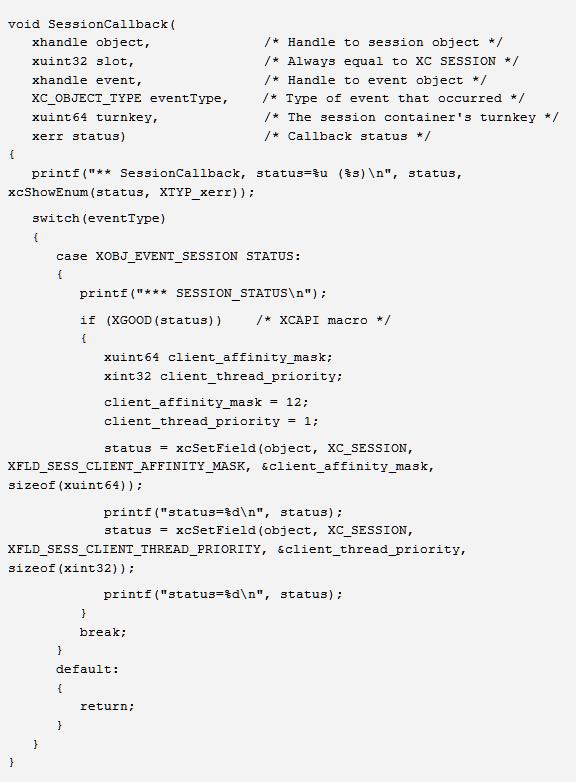
Code example as text (to cut and paste).
In addition, note that thread affinity should also be set for the XCAPI background thread. This should be done once, while XCAPI is in a connected state, immediately after the application's first call to xcCreateSession() in the main section of the application. The two fields used for affining the background thread are "CLIENT_BG_THREAD_AFFINITY_MASK" and "CLIENT_BG_THREAD_PRIORITY".
In general, for multi-threaded client application, users should create one or more container objects as children of each of their application's SessionTicker instances, then distribute subscriptions as evenly as possible across those child container objects on a per-session basis. To avoid excessive context switching among threads, the application designer should try to limit the total number of active callback threads running within an application to no more than the number of CPUs available in the client machine.
The API's automatic reconnection/resubscription mechanism can be disabled by setting the SessionTicker object's "DISABLE_RECONNECT" field to XTRUE. (The field is XFALSE by default.) If the field is set to XTRUE, the API's automatic reconnection/resubscription mechanism is disabled. In this scenario, a client disconnect terminates the XCAPI session and all of its data subscriptions, and the client application receives an XNOTCONNECTED status message. No further action is taken by the Exegy API. Note that disabling automatic reconnect/resubscribe prevents an XCAPI application from failing over to an alternative device in the event of a disconnection.
In summary, then, for multi-CPU client machines, the recommended practice is to create multiple SessionTicker instances, then affine each session object's callback thread to a particular CPU core, distributing subscriptions across the child containers so that each session-owned thread receives approximately the same processing load.
Please note again that each discrete SessionTicker object created via xcCreateSession() represents an independent user login session, even if the same user ID and credentials are used for each. As a result, each session instance created that way counts against the maximum number of user connections permitted per Exegy appliance.