Auto RFQ
Auto Request for Quote (RFQ) functionality for Exegy’s Metro Trading Platform creates a seamless user experience for both creating and interacting with RFQs in the market.
Metro makes it easy to create and use RFQs
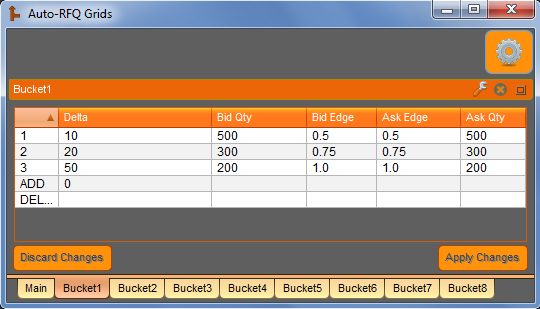
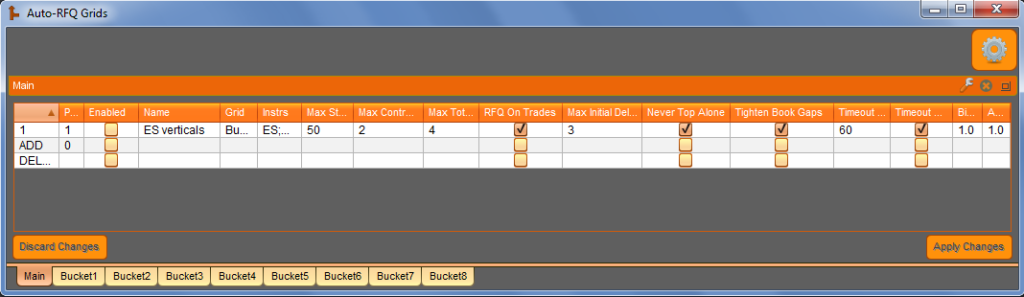
The “Auto-RFQ” job allows the user to configure rules to automatically respond to strategy RFQs in precise, predetermined ways. The job allows the user to customize their strategy quotes by strategy type, maturity, delta range, max strike width, max strategy legs, max contract legs, and a user-defined priority level. The algo supports an unlimited number of delta buckets for the response quote settings (bid/ask quantities and edges). Intelligent joining rules include “Never Top Alone” (avoid being the only top-of-book bid or ask), “Tighten Book Gaps” (avoid being more than 1 tick off the existing top-of-book), and a configurable initial delay (allow other market participants to create a market before you join). Each RFQ response can also be assigned a variable timeout. Specifications are conveniently organized and edited through a grid control.
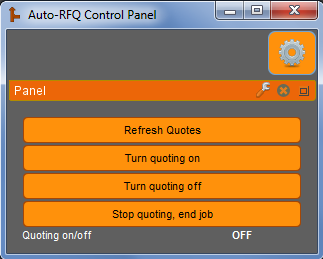
Any strategy RFQ that cannot be matched to one of the grid row specifications will be sent immediately back to Metro and will be handled based on Metro’s settings. Once a quote has been sent by the “Auto-RFQ” job, any further market updates are handled by Metro until either the user refreshes quotes (to reset strategies back to their default settings) or turns the “Auto-RFQ” job off and back on. If the job is running concurrently with the “Active Volatility Manager” job (see above), the user can choose to pull quotes and stop the “Auto-RFQ” job in the event of a breach of any of the security parameters monitored by the “Active Volatility Manager”.
Supported option strategy types include: Condor, Butterfly, Calendar Diagonal, Iron Butterfly, Strangle, Straddle, Risk Reversal, Iron Condor, 3-Way, Calendar Horizontal, Horizontal Straddle, Vertical, Xmas Tree, Generic, Double, Ratio 1×2, Ratio 2×3, Covered, and Outright.
Please contact the developer at kevin@axonetric.com with any questions you might have regarding technicalities, client use cases, etc.
All of the variables below can be configured or modified at runtime. This gives users the power to modify their job behavior throughout the day without having to make code changes.
| Name | Type | Default | Description |
|---|---|---|---|
| instruments | instruments | all instruments on which to listen | |
| default_timeout | int | 15 | the default RFQ timeout (seconds) |
| verbosity | int | 2 | logging level: 0=minimal, 1=basic, 2=detailed, 3=extended |
| grid_name | string | main grid will be named “RFQ_Main_[grid_name]” | |
| specialFlags | string | optional; CLDB=Clear grids db, FS=fast startup | |
| checkVolBeforeResponse | int | 1 | 0=No, 1=Yes |
| tightenBookGapsEdgeFloor | double | 0.0 | min allowed edge (in ticks) after ‘Tighten Book Gaps’ rule |
| excludeInstrsWithText | string | optional comma-delimited list of search strings to exclude (case-sensitive) | |
| reqTextForInstrInclude | string | optional comma-delimited list of search strings to require, per-leg, for instrument inclusion (case-sensitive) | |
| reqCoveringFutureInSameMonths | int | 0 | 0=No, 1=Yes |
| onFillRollingWindowInSecs | int | 0 | 0=disabled, 1-600=window length in seconds |
| onFillRollingWindowQtyTrigger | int | 0 | 0=disabled, 1+ = abs cumulative qty to trigger timeout |
| onFillTimeoutInMins | int | 0 | 0=disabled, 1-360=instrument timeout in minutes |
| skipDelayIfMaxSpreadWidthInTicks | int | 0 | 0=whole skipDelay feature disabled, 1-50=max allowed spread width (ticks) |
| skipDelayIfMinSpreadSize | int | 0 | 0=whole skipDelay feature disabled, 1+ = min required qty on bid and ask |
| skipDelayForRFQOnTrades | int | 1 | 0=No, 1=Yes |
| edgeValuesUnits | int | 1 | 1=In ticks, 2=In decimal price |
| crossedMktProtection | int | 0 | 0=Off, 1=One-sided response, 2=Skip response |
Remember that in Metro NOW, dashboards and widgets can be utilized in both OnRamp and Metro clients.
Related Resources

Launching in APAC: Comparing Asia’s Major Exchanges
The Asia-Pacific (APAC) region represents a significant opportunity for global trading firms, with some of the world’s largest and most active equities and derivatives markets. From established financial hubs such…

The Ultimate Guide to Middle East Markets
How the regions are structured and what it means for your market data Your MENA market access strategy depends on the exchanges, ownership rules, and index benchmarks in each jurisdiction.…
New PCAP Service from Exegy Offers FPGA-grade, Hardware-timestamped Raw Market Data Capture
New York, Chicago, London — October 13th, 2026 — Exegy, the provider of high-performance market data and trading infrastructure for capital markets firms, is today announcing in partnership with FMADIO,…